0:00
0:00
Speed
 By Muhammad Haris · November 14, 2026 · 23 min read
Open a backlink report and you will see two numbers side by side: backlinks and referring domains. They sound like the same thing, and they are related, but they measure different things — and reading them the wrong way is one of the most common mistakes in SEO. A site boasting about thousands of backlinks can have a weaker profile than a site with a few hundred, and the reason is in the second number.
I run Onyx Growth Labs, and I read backlink reports every week — for our own sites first, then for clients. The first number I look at is not the backlink count. It is the ratio between the two numbers, because that one division tells me in five seconds whether a profile is built on many independent sites or on a handful doing all the work. This guide gives you the full picture: what each number counts, the ratio that matters, what the studies actually say, how to check both numbers for free, what a healthy profile looks like, and how many referring domains you actually need.
A backlink is one hyperlink from one page on another website to a page on yours. A referring domain is the website doing the linking, counted once no matter how many links it gives you. If a blog post links to your homepage three times, that is three backlinks and one referring domain. Ten different websites linking once each give ten backlinks and ten referring domains. So backlinks count links; referring domains count linkers.
Mangools’ referring-domain guide puts the consequence plainly: linking domains determine the quality of your backlink profile, rather than backlinks alone. Wikipedia puts the method plainly too: link building is the process of acquiring hyperlinks from other websites to your own. The method is the same at every budget; what changes is how many different sites vouch for you.
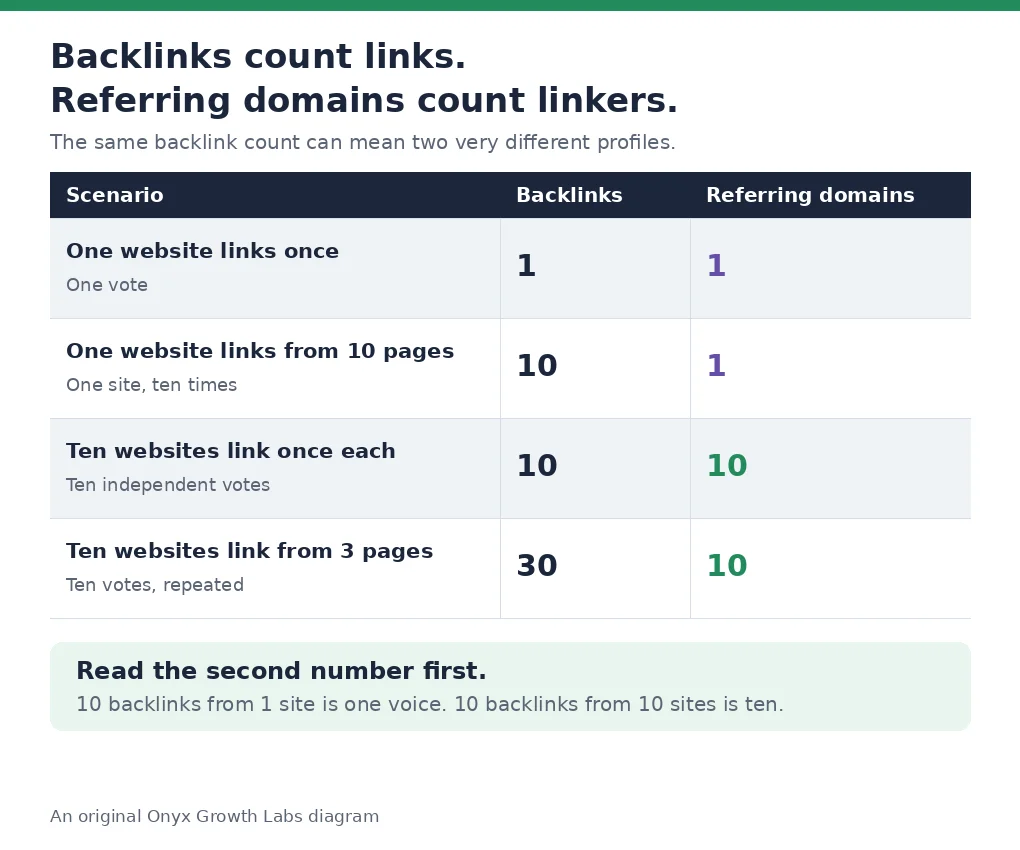
Here is the same idea as a table, because the numbers make it clearer than any paragraph:
| Scenario | Backlinks | Referring domains |
|---|---|---|
| One website links from one page once | 1 | 1 |
| One website links from ten different pages | 10 | 1 |
| Ten websites each link once | 10 | 10 |
| Ten websites each link from three pages | 30 | 10 |
Read the second and third rows together and the whole topic clicks into place. Ten backlinks from one site and ten backlinks from ten sites look identical in the backlink column — and they are nothing alike as a vote of confidence. One is a single website saying the same thing ten times. The other is ten independent websites reaching the same conclusion. Search engines treat those two situations very differently, and so should you.
If you are new to this, start with what is link building — it explains how links work and how to judge one before you chase it. The rest of this guide assumes you know what a link is, and answers the question the report leaves open: which number do you actually watch?
Divide the first number by the second and you get the one reading that matters: backlinks per referring domain. It tells you how concentrated a profile is. A ratio near 1 means almost every link comes from a different site. A ratio of 50 means a handful of sites are doing nearly all the linking. Here is how to read it.
A ratio of 1 to 2 is the healthy shape. Most sites that earn links naturally sit here: a blog links once to a guide, a directory lists the homepage, a journalist cites one page. Our own site is a good example, and I will use its real numbers because they are the only ones I can verify first-hand: onyxgrowthlabs.com had 24 backlinks from 17 referring domains in Ahrefs on 14 November 2026 — a ratio of 1.4. Nothing spectacular, and nothing wrong with it. That is what a small, steadily growing profile looks like.
A ratio of 3 to 5 means look closer. It is not a problem by itself — a partner site that links to several of your pages, or a publication that cited you in three articles, will push the ratio up honestly. But it is the point where you should open the linking-sites list and check who the repeat linkers are. If the top three domains supply half your links, your profile depends on three relationships.
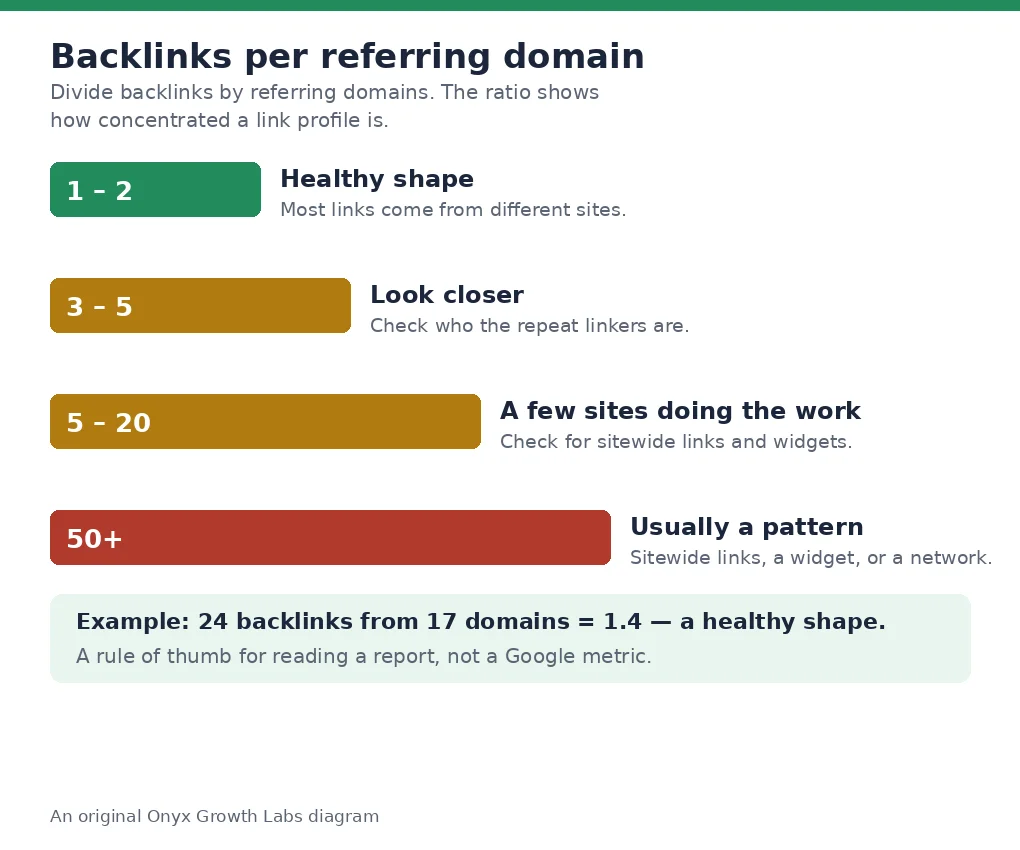
A ratio of 5 to 20 usually means a few sites are doing the work. A sitewide link — one link repeated in a footer or sidebar on every page of another site — can add hundreds of backlinks from a single domain overnight. So can a widget, a badge, or a template credit. None of those are links you earned page by page, and none of them carry the weight the headline number suggests.
A ratio above 50 is almost always a pattern, not an achievement. The clearest example comes from LinkDoctor’s guide: a site with 450,000 backlinks from 220 referring domains works out to roughly 2,045 backlinks per referring domain. That is not 450,000 votes. That is 220 sites, with a few of them linking thousands of times each. The backlink count is a headline; the domain count is the story.
One honest caveat before you use it: the ratio is a rule of thumb, not a Google metric. Google publishes no threshold, and no tool will flag a ratio for you. It is a way of reading a report, the same way a doctor reads a ratio in a blood test — the number does not diagnose anything on its own, but it tells you where to look next. Use it that way and it will save you from the most common misreading in link building: celebrating a backlink count that a handful of sites produced.
The claim that diversity matters more than volume is not a hunch. It is the one thing the big correlation studies agree on — and they are also honest about how weak the link is, so this section reports the numbers with the caveats attached.
Ahrefs studied the top 1 million US keywords by search volume in January 2025 and compared the top 20 rankings against a range of link metrics. Referring domains correlated with ranking position at a Spearman correlation of 0.255. Total backlinks scored 0.248. Domain Rating — the metric many site owners optimise for — scored only 0.131. For local queries, referring domains reached 0.33. Ahrefs itself calls those weak correlations, and its author Patrick Stox is careful to add that correlation is not causation and that weak does not mean unimportant. The honest reading is narrow: of all the link measures, the number of different sites linking is the strongest signal — and it is still only one signal among many.
Ahrefs’ earlier study of about 920 million pages, published in 2024, reached the same conclusion from the other direction: referring domains were the strongest correlating backlink metric for both rankings and organic traffic, ahead of total link count. And Backlinko’s analysis of 11.8 million Google search results found that the number one result has on average about three times more referring domains than pages in positions 2 to 10 — and 3.8 times more backlinks. The two numbers move together, but the domain count moves first.
Two more figures complete the picture. First, the baseline is low: Backlinko’s analysis of 912 million blog posts found that 94% of them have zero external links. Earning links from even a handful of external sites already puts a page ahead of most published content — which is why a small site with 17 referring domains is not behind, it is started. Second, the diminishing returns are measured: Ahrefs found in 2020 that 79.23% of referring domains link to the same website more than once, most of them 2 to 5 times. Each additional link from the same domain adds less than the one before it, because the second link is the same site repeating itself, not a new site agreeing.
Google has said the same thing in plain words. On SEO Office Hours, Google’s John Mueller said the total number of links does not matter at all and that quality is what counts — and Ahrefs reports his answer that one really good link from one website can be an important sign that a site is relevant. The studies, the tool data and Google’s own statements all point the same way: count the sources, not the links.
You do not need a paid tool to read your own profile. Three free views cover almost everything that matters, and each one has limits you should know before you trust its numbers.
Start with Google Search Console, because it is the only place that shows links the way Google sees them. Open the Links report for a site you verify. Under External links there are three views. Top linking sites is the referring-domain view — one line per website, with how many links each one sends. Top linked pages shows which of your pages the reported links point to; sort by linking sites to see which pages have the most links from unique websites. Top linking text shows the most common anchor text. The report is a sample, not a full list: tables show up to 1,000 rows, you can export up to 100,000 rows, nofollow is not marked, and removed links can still appear for a while. For your own site it is the count I would start from, because no crawler knows which links Google actually counted.
Then add a second view, because no single tool sees every link. Ahrefs Free — formerly Ahrefs Webmaster Tools — shows up to 1,000 backlinks at a time on websites you verify, with no limit on how many sites you verify. Ahrefs’ guide to finding who links to your site walks through both views: the Referring domains report lists every website linking to you, and the Backlinks report lists every individual link. Semrush’s free backlink checker works without an account once a day and shows up to 15 backlinks. Moz’s Link Explorer gives 10 queries a month with a free Community account. Bing Webmaster Tools is free and is the only genuinely free tool that lets you compare your backlinks against two competitor domains side by side.
Why do the numbers disagree between tools? Because each tool crawls the web itself and counts links its own way. Google Search Console shows the links Google reports for a site you verify. Ahrefs, Semrush, Moz and Majestic each show what their own crawler has found. The same site shows a different number in every tool you open — and that is normal, not a bug. The rule that follows is simple: compare a site only inside one tool. Your 24 backlinks in Ahrefs and your 40 in Semrush are two different measurements, not a contradiction, and neither one is the “real” number. Google’s own report is the closest thing to ground truth, and even that is a sample.
One check most audits skip: whether the links you already have actually count. Run each new link through our free backlink indexability checker to see whether Google has indexed the linking page at all, because a link Google has never seen passes nothing. A backlink profile full of unindexed pages is a profile full of promises, not results.
A healthy profile is not a big number. It is a shape — and the shape has six parts you can check in ten minutes.
First, the ratio sits near 1 to 2 backlinks per referring domain. Most links come from different sites, and no single site supplies a large share of the total. Second, the links spread across many pages, not just the homepage: service pages, guides, and tools people actually found useful. A profile where 90% of links point to the homepage is a profile with one page worth citing. Third, the anchor text varies — brand names, plain URLs, and descriptive phrases mixed together. A profile where nearly every link uses the same exact commercial keyword looks manufactured, and that is one of the clearest signs of bought links. Fourth, the domains are relevant to the business. A link from a site in your industry is worth more than one from an unrelated high-traffic site, and a profile full of unrelated domains is a profile that tells Google the wrong thing about what you do. Fifth, the follow mix is natural: mostly dofollow, with nofollow links mixed in. A profile with zero nofollow links looks manufactured, because real sites link both ways. Sixth, the growth is steady month by month. New referring domains appear as content earns mentions and customers or journalists reference the business — not in bursts, and not from one source.
The last test is the one I like best, because it cannot be faked by any tool: does the profile include links you did not ask for? Mentions from people who found the content on their own, with no outreach behind them, are the clearest sign a profile is real. If every link in your report traces back to an email you sent, the profile is a campaign, not a reputation. Our guide to how to do an SEO audit walks through the full profile check, including the anchor-text and relevance passes above.
A bad ratio is never the problem itself. It is the symptom — and each trap behind it shows up in the numbers in its own way. Here are the five I see most often, and how each one looks in the linking-sites list.
Sitewide footer and sidebar links are the classic one. A partner, a client or a directory puts your link in a footer or a sidebar, and it repeats on every page of their site. One domain, hundreds of backlinks, ratio destroyed in a day. The links are real, and they are worth almost nothing individually — the second link from the same page adds less than the first, and the two-hundredth adds almost nothing.
Syndication is the honest version of the same pattern. A press release or an article gets republished across a network, and each copy carries the link. The links are legitimate, but they all come from the same story, so they do not add up to independent endorsements. Check whether the linking pages are the same article repeated, and you will know.
Widgets, badges and template credits are the quiet version. A free tool, a badge or a theme credit that links back to your site from every site that installs it. Each installation is a new domain, so the domain count looks good — but the links are all identical, all in the same place, and all with the same anchor text. Google has discounted these for years, and a profile built on them is fragile: if the widget is removed, the links go with it.
One big partner is the trap that feels safest. A supplier, a client or a sister site links to you from dozens of pages, and the relationship is genuine. The risk is concentration: if that one site removes its links, or changes its template, a large share of your profile goes with it. A profile spread across many relevant domains is far harder to damage.
Directories are the last one, and the most boring. A link from a real, curated industry directory is fine. A hundred links from directories nobody visits are not a profile — they are a list. They inflate the backlink count, they add almost no referring-domain diversity that matters, and they are the first links a spam update discounts.
Google’s spam policies are the authority on where the line sits: buying or selling links that pass ranking credit is link spam, alongside excessive reciprocal linking, automated programs, and low-quality directory links. Read the full list once a year. If a tactic someone is selling you matches any line on it, walk away. And one check before you judge a link: a link to a page with crawl errors or thin content will look like it did nothing — that is a technical SEO problem, not a link problem, and it belongs in the same programme as the writing.
There is no fixed number, and anyone selling you one is selling, not advising. What matters is the gap between you and the pages already ranking for your keyword — measured in domains, not links.
The competition bands give you the shape of it. LinkForce’s 2026 guide, drawn from real SERP data, puts low-competition keywords at 4 to 15 referring domains at the page level, with pages on page one typically holding 4 to 10. A local service page often ranks in the top three with fewer than 8 referring domains, especially when the site has broad citation authority from local directories and niche mentions. Mid-competition keywords sit at 15 to 50. High-competition terms need far more — and at that level the number is the least interesting part, because relevance and authority decide it.
The method is more useful than any band. Open a backlink tool, enter the top ten pages ranking for your target keyword, and write down their referring domains at the page level. Aim for the median, not the leader — that is Zutrix’s rule, and it is the right one, because the leader is usually an outlier with years of head start. If the median page has 20 referring domains and you have 4, your gap is 16 domains, not 16 links. Count domains, because ten links from one site count for far less than ten links from ten sites.
Pace matters as much as the total. Opalvector’s 2026 guide puts a sustainable benchmark at 10 to 20 new, high-quality referring domains per month for a growing site — over a year, that is a solid base of more than 100. A new site that gains 100 domains in a month has not earned them; it has bought them, and the spike is the first thing a spam update notices. Steady growth from relevant, real sites over time is the only pace that holds. Our guide to how to do keyword research walks through picking the topic first, because the gap analysis only works when the keyword is one you can actually win.
Growing the backlink count is easy. Growing the domain count is the actual job — and the five moves below are framed by what they add to the domain count, not the link count.
One linkable asset first. Not ten blog posts — one thing worth citing: a free tool, a calculator, original data, a benchmark, an opinionated framework. A single well-promoted asset can earn dozens of links over a year because other writers reference it, and each writer is a new domain. The method that groups related searches so the asset targets one clear topic instead of five competing for the same search is keyword clustering — one asset, one topic, one page that deserves to be cited.
Digital PR second. Create something newsworthy — original data, a survey, a contrarian take backed by real experience — and pitch it to journalists. One data study can earn dozens of links from news sites, and news sites are new domains by definition. Our white-hat link building guide covers how earned links work in practice: digital PR, broken link building, linkable assets, expert commentary and resource pages.
Broken link building third. Find dead links on relevant resource pages and suggest your page as the replacement. It works because you solve the site owner’s problem instead of just asking for a favour — and every replacement is a domain that did not link to you before.
Unlinked mentions fourth. Someone writes about your business but forgets the link. A quick, friendly email asking them to add it has one of the highest success rates in link building, because they already know and trust you. Set a free alert for your brand name and catch these as they happen — each one converts an existing mention into a new referring domain.
Journalist queries fifth. Platforms like Connectively (the successor to HARO) and Featured connect reporters with expert sources. Reply to queries in your lane with a genuinely useful, specific quote and you can land a named mention — and a link — in a publication you could never have pitched cold. Speed matters: the first useful answer usually wins.
What they share: they start with something worth linking to, and they each add new domains rather than more links from the same ones. If a tactic adds ten links from one site, it added one domain. If it adds ten links from ten sites, it added ten. Judge every tactic by the second number.
In 2027, a growing share of answers comes from AI summaries and chat-style results rather than a list of blue links. When someone asks an AI assistant for the best provider in your niche, it names two or three brands directly. Referring domains matter here too — and the studies now measure it directly.
DataForSEO’s Search Insider 2026, drawn from roughly 1.14 billion backlink URLs, found that referring domains correlate with AI citations at a Spearman correlation of 0.406 in AI Overviews and 0.377 in ChatGPT — a moderate relationship, and stronger than the correlation with ordinary rankings. In the same study, domains ranking #1 in Google had a median of 111 referring domains, 31% more than the 85 for domains ranking in positions 4 to 10. The domains that get cited are, broadly, the domains that already have diverse link profiles.
Ahrefs’ May 2025 analysis of 75,000 brands measured a different outcome — how often AI Overviews mention a brand at all — and found referring domains at 0.295, total backlinks at 0.218, and branded web mentions at 0.664. That last number is the important one: for being named in an AI answer, mentions of your brand across the web matter more than links do. The two studies agree once you see what each measured: links help a domain get cited as a source; mentions help a brand get named. Build both, and build them honestly.
No page can guarantee a citation. The honest version: links raise the chance that an AI answer names your brand, because they raise the authority behind the page — and the same diverse, relevant profile that ranks in search is the raw material AI systems draw on. The GEO vs SEO vs AEO comparison explains how these visibilities relate — and why the same page can rank in search, appear in an AI answer, and still need a different check for each. Google’s own guidance is the authority here: “Our focus is on the quality of content, rather than how content is produced.” That is from Google Search Central’s guidance on AI-generated content, published February 2023 and still live on 20 November 2026. And if you want to know whether your pages show up in AI answers too, our guide to how to track AI visibility shows the checks we run.
Take these into any conversation with an agency or link seller. The first five are the ones from the old version of this guide, kept because they still work; the last two are new, and they are the ones that matter most for this topic.
How many referring domains will this work add, not just how many links? Are those domains relevant to my industry and my customers? What will the anchor text look like, and how varied will it be? Can I see examples of the sites my links will come from before I pay? What happens to the links if I stop paying — do they stay or disappear? What is the backlinks-per-domain ratio of the links you will build — and will you show me the ratio before and after? How many NEW referring domains will this add each month, not just new links?
The answers tell you whether you are buying authority or renting a number. An agency that talks only about backlink counts, and will not show you the domains behind them, is selling the number. The same vetting questions in our guide on how to choose an SEO agency apply here — and the test is the same in both: judge a provider by what it can show you, not by the size of the number it quotes.
If you have read this far, you have the definition, the ratio, the studies, the free-tools method, the competition bands, and the seven questions. The next step is a ten-minute check of your own profile — and now you know which number to look at first.
Open the Links report, read the Top linking sites list, and divide. If the ratio sits near 1 to 2 and the domains are relevant, your profile is in good shape — keep earning new domains at a steady pace. If the ratio is high, open the list and find out who the repeat linkers are before you spend another dollar on links. If the domain count is low, the gap analysis in this guide tells you exactly how many you need and where they have to come from.
That is what our content strategy service does for clients: we decide the topics, the order, and the cluster structure first, then write the pages, then earn the links. Our link building services raise the authority those pages need to hold their positions, and our local SEO services cover the map pack work, the profile, the citations and the reviews. One team, monthly terms, no lock-in.
If you want that profile check done for you, our SEO audits cover the full profile review, with the fix list ranked and the re-crawl included. Our own pricing is published on our pricing page — verify it live there before you budget, because prices change. Choosing well matters more than choosing fast. If you want a second opinion on a link package you are holding — even a competitor’s — bring it to a free consultation. We will tell you honestly whether it is good, including when the answer is “this is fine, you do not need us.” Our results page shows the client work we have published.
A backlink is one hyperlink from one page on another website to a page on yours. A referring domain is the website doing the linking, counted once no matter how many links it gives you. Ten links from one site means ten backlinks but one referring domain; ten links from ten sites means ten backlinks and ten referring domains.
Neither alone, but if you must pick one number to watch, pick referring domains. Ahrefs’ January 2025 study of the top 1 million US keywords found referring domains correlated with rankings at 0.255, total backlinks at 0.248, and Domain Rating at only 0.131. Read them together: a high backlink count with few domains usually means a few sites are doing most of the linking.
Near 1 to 2 backlinks per domain is the healthy shape: most links come from different sites. A ratio of 3 to 5 means look closer at who the repeat linkers are. A ratio of 5 to 20 usually means a few sites are doing the work. Above 50, it is almost always a pattern — sitewide links, a widget, or a network — not an achievement. The ratio is a rule of thumb, not a Google metric.
No fixed number — it depends on your market. Low-competition keywords typically need 4 to 10 referring domains at the page level; mid-competition needs 15 to 50; a local service page often ranks in the top three with fewer than 8 (LinkForce, 2026). Measure the gap against the median of the top ten pages for your keyword, and grow steadily at 10 to 20 new domains a month.
Google Search Console’s Links report is the first stop: Top linking sites is the referring-domain view, one line per website. Add Ahrefs Free for a second view — up to 1,000 backlinks visible on sites you verify. Semrush’s free checker works once a day without an account; Moz’s Link Explorer gives 10 queries a month; Bing Webmaster Tools is free and compares two competitors.
Because each tool crawls the web itself and counts links its own way. Google Search Console shows the links Google reports for a site you verify. Ahrefs, Semrush, Moz and Majestic each show what their own crawler has found. Compare a site only inside one tool — the numbers are different measurements, not a contradiction.
No, but they are not the same as links from many domains. Multiple links from one respected, relevant site are genuinely useful — they pass authority to the pages they point to and bring readers who click through. They just do not carry the same weight as the same number spread across many independent sites, because each repeat adds less than a first link from a new domain.
Check what changed first. If the new links come from relevant sites with real content, it may be a genuinely popular piece of work. If they come from unrelated directories or link farms, the spike is a risk worth addressing. A jump of 50 backlinks from one domain means one site found your content useful 50 times; a jump of 50 referring domains means 50 separate sites made that call — and the second one is the one to celebrate.

Muhammad Haris is the Founder of Onyx Growth Labs — an SEO specialist, content writer and SEO team lead. He writes the agency's guides on SEO, AI search optimisation, GEO and AEO, technical SEO, local SEO, Google Business Profile optimisation, link building and content strategy. Based in Abbottabad, Pakistan, he helps businesses worldwide get found on Google and in AI search answers.
If your customers speak more than one language, an English-only website is quietly turning some of them away. Multilingual SEO is the…
Read articleIf you run a business and you have ever uploaded a video, the questions you ask first are always the same: why…
Read articleIf you run a business in Sheffield, the questions you ask before hiring SEO help are always the same: what does it…
Read article


Leave a Reply