0:00
0:00
Speed
 By Muhammad Haris · November 21, 2026 · 27 min read
If you run a business and you have ever uploaded a video, the questions you ask first are always the same: why does nobody find it, what does YouTube actually rank on, do I need the video on my own site as well, and how long before anything moves? This guide answers all four, in order, with the numbers published in 2026. One honest note before the method: this post was published today, so there is no Search Console data for it yet — no query has brought anyone here, because the page is hours old. The plan in this guide is built from the search results and the sources named below, not from our own query data, because there is no query data to build from. I run an SEO agency that serves clients worldwide, and I have watched more businesses waste good videos than bad ones — a decent video, filmed and edited well, uploaded, and then left with a vague title, no transcript, no schema, and a thumbnail YouTube picked at random. Wikipedia describes YouTube as a video sharing platform, and the scale of it is the reason the packaging matters: roughly 2.58 billion people used YouTube in 2026, about 42.8% of everyone online — and about 69% of watch time comes from phones, which sets the minimum legibility bar for every thumbnail and title you publish.
The short version is simple, and it is the whole guide in one paragraph: video seo is two jobs, not one. Google ranks the page the video lives on, and YouTube ranks the video itself — and the two systems read different signals. Google needs to be able to find, understand and trust the video, which means a transcript, VideoObject schema, a video sitemap, and one video per page. YouTube needs proof that people choose the video and stay watching it, which means a title and thumbnail that earn the click, a first thirty seconds that keeps the viewer, and retention that holds. Do the Google half first, because it is quick and it is entirely in your control, and then do the YouTube half every time you publish, because it compounds.
The short answer is that video seo means making a video findable in two places at once: in Google search, and in YouTube search. The two are not the same job, and treating them as one is the most common mistake in this whole field. Google shows video in the main results, in the Videos tab, in Discover, and increasingly inside AI Overviews that cite video sources. YouTube shows video in its own search and in its recommendation feeds — the home page, the Up Next panel, and Shorts. A video that ranks on YouTube but has no transcript and no schema may never appear on Google at all, and a video with perfect schema on a page nobody watches will not rank on YouTube either, because YouTube ranks on what viewers do, not on what the page says.
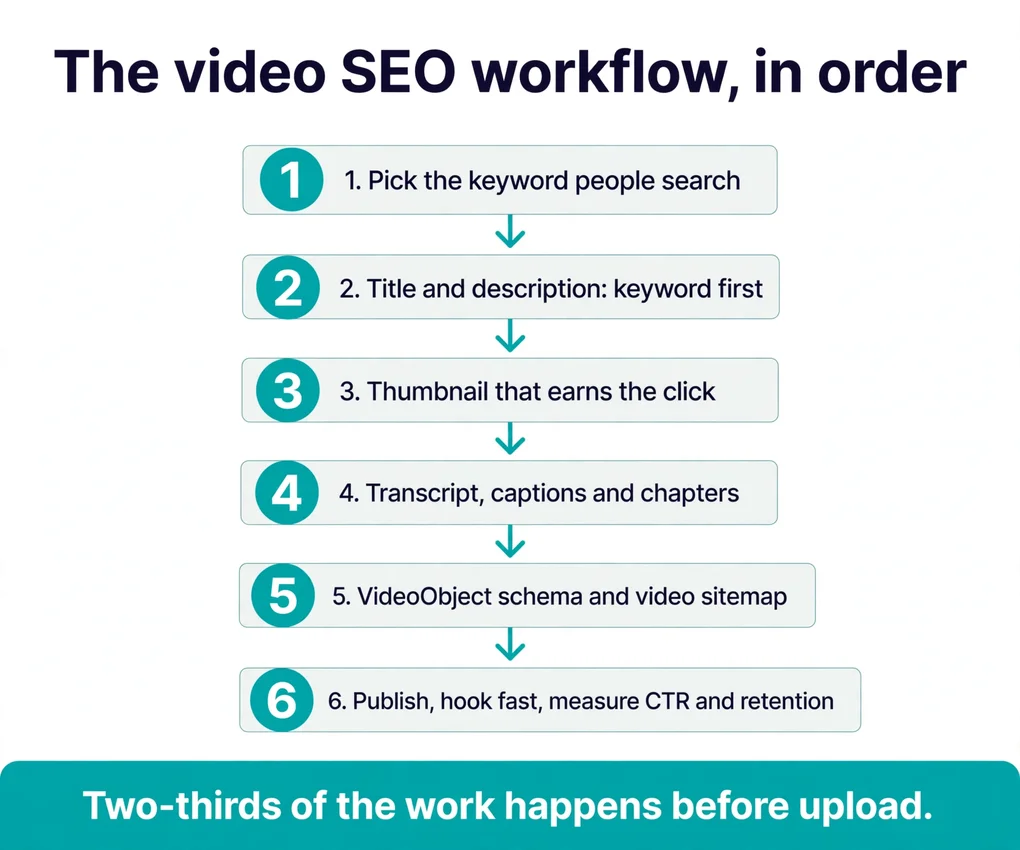
Here is the order of the work, with the evidence behind it. First, give the video a page Google can read: one video per page, a transcript on the page, VideoObject schema, and a video sitemap. Second, write the title and description for the search the video answers, with the keyword first. Third, design a thumbnail that earns the click, because click-through rate is the door everything else walks through. Fourth, hold the viewer: the first thirty seconds decide most of a video’s fate, and retention below roughly 40% gets a video deprioritised whatever its thumbnail did. Fifth, host deliberately — YouTube for reach, your own site for control — and measure the two numbers that matter, impressions click-through rate and average view duration, in YouTube Studio.
The numbers behind that order are worth naming, because they are the reason the order is the order. In Wyzowl’s State of Video Marketing 2026, 91% of businesses use video as a marketing tool — an all-time high — and 82% of video marketers say video has increased their web traffic. In HubSpot’s 2026 State of Marketing report, based on more than 1,500 marketers, 48.6% named short-form video a top-ROI format, against 28.6% for long-form. And in one analysis of more than 1.6 million videos, pages with properly implemented structured data appeared in 63% of relevant queries, against 22% without markup.
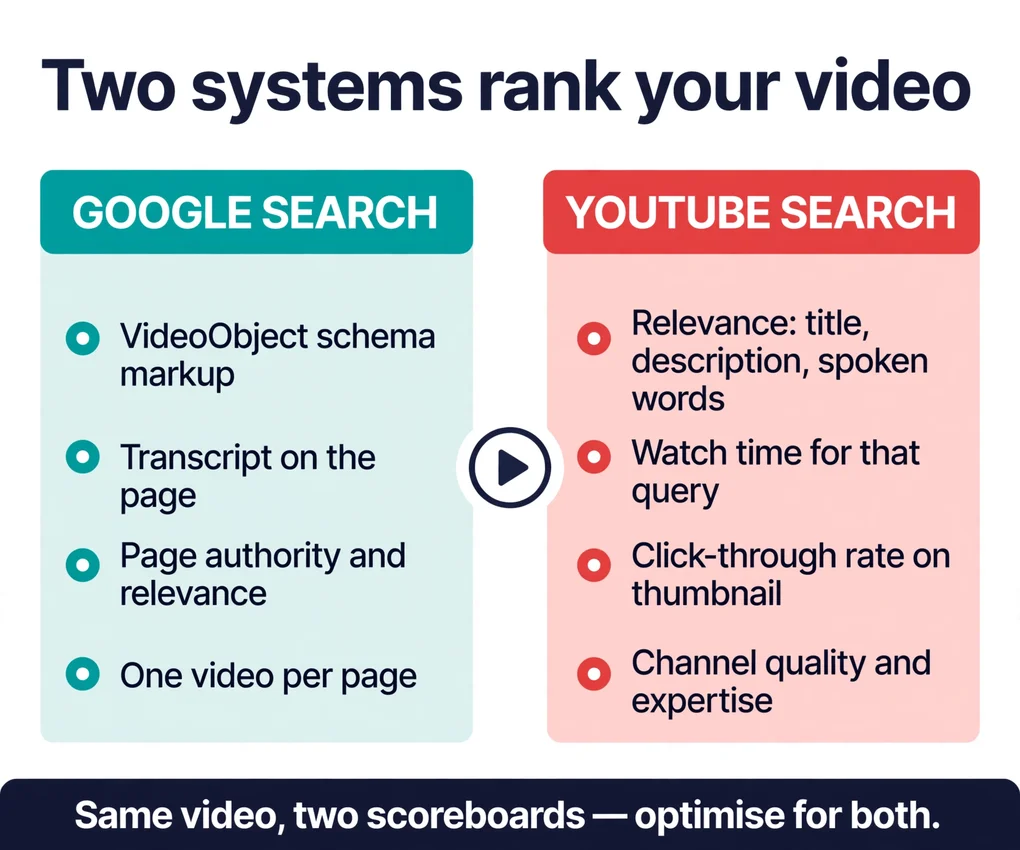
Before the method, the two systems, because most confusion starts with not knowing which one you are optimising for. Google and YouTube rank videos on different evidence, and a video can win on one and lose on the other for reasons that have nothing to do with quality.
Google ranks the page, asking: can I find this video, can I understand what it says, and is the page around it trustworthy? The signals are the ones this guide covers in the next two sections — VideoObject schema, a transcript, a video sitemap, one video per page, and the authority of the page itself. Google measures dwell time on the embedding page more than watch time inside the player: how long users stay on your page after clicking from search results, not just how much of the video they finished. And Google’s AI features run on the same core ranking and quality systems as regular search, so the fundamentals that earn a ranking are the same ones that earn a citation inside an AI Overview. YouTube now captures roughly 20% of citations across all AI search systems, according to Search Engine Land’s 2025 citation-share analysis — which is why a transcript matters twice: once for Google, and once for the answer engines that read it.
YouTube ranks the video. Its own help page on how YouTube search works names three elements, and says their importance varies with the type of search: relevance — how well the title, description and video content match the query; engagement — signals such as watch time for a video on that particular query; and quality — channels that show expertise, authoritativeness and trustworthiness on a topic. Results are personalised too, because the system may consider a viewer’s search and watch history, which is why two people see different results for the same words. And search is only one door on YouTube: the recommendation system generates more than 70% of viewing time, and it follows what each viewer watches, likes, and rates — the home page is primarily personalised from watch history, while the Up Next panel uses the video being watched as its main signal.
Keywords get you considered, but clicks and watch time decide whether you stay. The AI side belongs in the same check, because video now feeds more than rankings: our guide on how to track AI visibility shows the checks we run on the AI side of search, and the GEO vs SEO vs AEO comparison explains how these visibilities relate — but the work itself is the old discipline done properly. Google Search Central’s guidance on AI-generated content says what matters is whether the content is helpful and accurate, not how it was produced — which, for a video question, is the same test as ever: did the video help the person who searched, or did it only help the channel that published it?
Google finds videos the same way it finds everything else — by crawling pages — and then applies video-specific eligibility rules before showing them. The mechanics are few, and all in your control, which is why this section comes first.
First, one video per page. Google indexes at most one video per page for its video features. If a page embeds three videos, Google picks the most prominent one and ignores the rest for video search. Give every video you want ranked its own dedicated page, with a descriptive URL, a keyword-targeted title tag, and surrounding copy about the video’s topic. A page that is the same text with the video swapped is not a video page. It is a template, and Google treats it as one.
Second, the video must be the main content, not decoration. A video buried below ten paragraphs of unrelated text, or an autoplay background loop, does not qualify. The page should be about the video — title, description, and surrounding copy all describing the same topic. Match the on-page H1 to the video title, because consistency between title tag, H1, and video title is a relevance signal Google reads instantly. And keep the video prominent on the page: to earn a thumbnail-rich result on Google, a video should be the main content of its page, placed prominently, and backed by VideoObject schema and a video sitemap.
Third, the structured data. VideoObject schema is the single highest-leverage video seo action on the Google side, because it tells Google the video’s title, description, duration, upload date, and thumbnail in a form it can read without guessing. Google’s video best practices describe the full set of requirements — the video file must be crawlable, the thumbnail must be accessible, and the page must not block the video with a login — and Google’s VideoObject documentation lists every field the schema can carry. Add a video sitemap alongside it, because the sitemap is how you tell Google a video exists even when the page is new and has no links yet. Skipping the structured-data steps is the single most common reason videos never appear in Google’s video results, and it is the cheapest fix in this whole guide: it is an afternoon of work, once, and it applies to every video after it.
Fourth, the page itself. Page authority and relevance trump video-specific metrics on Google’s side: Google evaluates the hosting page’s overall quality, backlink profile, and content relevance before it ever looks at the video. Our guide to what is link building explains what a real link is and what a bought one looks like, and our guide to off-page SEO services explains what real off-page work is and what the bulk packages are not — the short version is that a real link survives being looked at, so run any link anyone reports to you through our free backlink indexability checker and ask to see the live link, not just a domain name. Our white hat link building guide covers the six techniques that earn links an editor chooses to give, and what each one costs. And the technical half belongs here too: a page cannot help a video if it cannot be crawled, or if it loads so slowly that visitors leave before they press play. The technical SEO work behind speed is worked through in priority order, because slow pages cost you visitors before they cost you rankings — and the largest contentful element on most video pages is the player itself, so do not let a video autoplay before the visitor has read a word.
A transcript is the single most valuable video seo asset in 2026, and the reason is simple: Google’s crawlers and AI answer engines both rely on transcripts to understand what a video actually says, since they cannot watch it. A video without a transcript is a sealed box with a label on it. The label — the title and description — tells the systems what the video is about in a sentence. The transcript tells them what it says, minute by minute, in the words the speaker actually used, which is the text the systems match against searches and quote in answers.
Publish the transcript as visible text on the page, not just inside the video file. A hidden transcript, or one buried in a file Google never opens, does the systems no good. The visible transcript is also the part of the page a visitor actually uses: someone deciding whether to watch a twelve-minute video will scan the transcript first, and a transcript that answers their question in the first lines is a transcript that earns the play. Keep it accurate — a transcript with errors is worse than a short one, because the systems will match the video against searches it does not answer, and the viewers who arrive on those searches will leave.
Captions are the same asset in a second form. Captions widen your audience — viewers who watch with the sound off, viewers in a second language, viewers who are deaf or hard of hearing — and they hand search engines and AI systems the text they need to understand and reference your content. Upload a proper caption file rather than relying on auto-captions alone, because auto-captions make mistakes on names, numbers, and terms, and those mistakes become the text the systems index. Say the target term aloud in the first thirty seconds and reflect it in the on-screen text, because spoken and on-screen content is a signal — a term said aloud early and shown on screen is doing real work that a term in the description alone does not do.
One more thing the transcript decides, and it is the newest: whether an AI answer cites your video. AI Overviews and AI Mode shifted the goal alongside ranking — now you also want to be the source the AI cites, and the fundamentals that earn that are the same ones that earn a ranking. An assistant answers from the pages it trusts, and a transcript is the text it quotes. A video with a clear, accurate transcript is a video an AI system can lift an answer from. A video without one is a video the AI cannot see at all.
Chapters are the most underused field in video seo, and the rules are hard requirements, not guidelines. Chapters need at least three timestamps, the first starting at 00:00, and each segment ten seconds or longer. Write them in the description, and make each chapter title a real label for what that segment answers — because chapters do two jobs at once. For the viewer, they are a map of the video: someone who wants one answer can jump to it instead of leaving. For the systems, they are a table of contents: Google can show a chapter as a key moment in search results, and a viewer who jumps to the right chapter is a viewer who stays.
Hashtags are the smallest field, and the rule is the shortest. YouTube caps hashtags at fifteen per video and ignores all of them if you exceed that, so three to five is the practical setting. Use hashtags that name the topic, not the trend — a hashtag that matches the video’s subject helps the systems place it, and a hashtag chasing a trend the video has nothing to do with is noise. Tags, the older field, are supplementary in 2026: YouTube’s own help documentation says they exist mainly to correct common misspellings, which makes tag-stuffing one of the least productive tasks in the workflow. Spend the time on the title and the first thirty seconds instead.
One more small field with an outsized effect: the spoken words. Two-thirds of the ranking work happens before upload, because spoken and on-screen content is a signal — a target term said aloud in the first thirty seconds and reflected in the on-screen text is doing real work. Write the term into the script, say it early, show it on screen, and put it in the chapters. A video that says its subject is a video the systems can place. A video that never says it is a video the systems have to guess at.
The title does two jobs at once: it tells YouTube what the video is about, and it tells the viewer whether to click. Both jobs are done in the same few words, and the order matters — put the target keyword in the first five words of the title, and keep the whole title under 60 characters so it does not truncate in search results. YouTube allows 100 characters in a title, but viewers may see only part of it, so the phrase a buyer would search goes first and the specific — the town, the model, the problem — goes after it. Front-load the primary keyword, and make the value proposition explicit: what the viewer gets, and why this video and not the one below it.
The description does the same job in more space, and most creators waste it: YouTube gives you 5,000 characters, and most use about fifty. The first 150 characters double as a search-result snippet, so they should carry the keyword and the value statement — not a channel intro, not a link to social profiles, not a greeting. Write the first two or three lines as if they were the whole description, because for most searchers they are. Then use the rest of the space properly: a fuller summary of what the video covers, the chapters with timestamps, links to the pages and tools mentioned, and a line about who the video is for. A description that only says “like and subscribe” is a description that told the systems nothing.
The research behind the title is the same discipline as everywhere else in SEO. Our guide on how to do keyword research walks through finding the searches customers actually use, and grouping searches so each page targets one clear intent is the same discipline as keyword clustering — the point is not the biggest keyword list, it is intent: is the searcher learning, comparing, or ready to buy, and which video answers them? On YouTube the research has one extra tool: type the topic into the YouTube search bar and note the autocomplete suggestions, because those suggestions are the searches real viewers actually type. Google’s guidance on creating helpful content rewards pages written for people, not for rankings — which, for a video title, is the same test as ever: would a viewer who searched that phrase be glad they clicked, or would they feel tricked?
One caution: changing a title can lift a video, but the system responds to changed viewer behaviour, not to the edit itself — so change a title when the data says the old one is not earning clicks, give the new one two weeks, and judge it on the click-through rate.
Click-through rate is driven almost entirely by how well the title and thumbnail work together, and the thumbnail does most of that work. A good click-through rate falls between 4% and 10%, and a sustained rate above 6% is considered strong — but only when paired with solid retention, because a thumbnail that earns clicks on a video nobody watches is a promise the video breaks, and YouTube notices.
The rules are few. Use a custom thumbnail, never the frame YouTube picks at random — 90% of top videos use custom thumbnails, because a random frame is almost never the moment that sells the video. Use a high-contrast image, 1280 by 720, with a clear focal point, an expressive face where it fits, minimal text of just a few words, and consistent branding so viewers recognise you. Remember where the thumbnail is seen: about 69% of watch time comes from phones, so the thumbnail is read at the size of a postage stamp, and text that is legible on a desktop is invisible on a phone. Test it at phone size before you publish, because a thumbnail that cannot be read at that size cannot earn the click.
The thumbnail is also a promise, and the promise is the part most creators get wrong. A thumbnail that promises something the video does not deliver earns the click and loses the viewer, and the loss costs more than the click gained — because retention, not clicks, is what decides whether YouTube keeps showing the video. The thumbnail and the title should agree with each other and with the first thirty seconds: the same claim, the same subject, the same tone. A viewer who clicks on a thumbnail of a finished kitchen and gets thirty seconds of an intro is a viewer who leaves, and a viewer who leaves in thirty seconds is a signal the system reads against you.
Watch time and audience retention are the two strongest ranking signals on YouTube, well ahead of raw view count or subscriber totals — and retention is the one most creators leave to chance. The first fifteen seconds decide most of a video’s fate, and the first thirty seconds decide the rest: if the viewer is still watching at thirty seconds, the video has a chance; if they left at ten, the thumbnail did its job and the video did not.
The hook is the whole technique. Open with the answer, not with the introduction. The first sentence should say what the video delivers and who it is for, and the first thirty seconds should show the most useful part of it — the result, the number, the before-and-after — before any background. Cut the intro: no logo animation, no “welcome back to the channel”, no biography. A viewer who searched for an answer wants the answer first, not an introduction.
Pacing is the second half of retention. Educational content performs best at 8 to 15 minutes with retention above 50%, according to one 2026 analysis of YouTube performance — and the length is not the point: every minute has to earn the next one. And when retention drops below roughly 40%, YouTube deprioritises the video regardless of click-through rate — a great thumbnail cannot save a video people click away from immediately.
The measurement follows the same rule as the rest of the work: judge retention where it lives, in YouTube Studio’s Engagement tab, on the retention curve — not on the view count. Since 24 August 2026, YouTube counts a view the moment a video starts to play, on Shorts, long-form and live alike, so a big number can hide a video that viewers abandon in seconds. The two numbers that tell you whether YouTube will keep showing a video are impressions click-through rate and average view duration, and both live in YouTube Studio.
Every video needs a home, and the choice is the first decision in this guide’s order, because it decides which system you are optimising for. YouTube is still the strongest option if the goal is to rank the video itself in Google’s video results and in YouTube search: Google treats it as a search engine in its own right, and YouTube is where the audience already is. A video on YouTube can be found by people who never visit your site, and that discovery is the whole point of publishing there. Search traffic drives 15% to 40% of total views on most channels, and it is the most predictable, compounding source available — but it is only one door, because recommendations generate more than 70% of viewing time, and recommendations follow the viewer, not the upload.
Your own site is the right home when control matters more than reach. A video hosted on your own site, or on a host like Vimeo, lives on a page you own — no competing recommendations beside it, no ads before it, no algorithm deciding whether it is shown. That control is worth more for some videos than reach is: a product demo on a sales page, a testimonial on a service page, a training video for existing customers. The trade is honest — you give up YouTube’s audience to keep the viewer on your page — and the right answer depends on what the video is for, not on which platform is fashionable.
Most businesses should do both, and the order is the method. Publish on YouTube for discovery, and embed the same video on a dedicated page of your own site for the Google half of the work — one video per page, transcript on the page, VideoObject schema, video sitemap. Do not duplicate the same video across multiple URLs on your own site, because Google will pick one and ignore the rest, and the duplicates dilute the page that should have won. A page that needs rebuilding rather than repairing is website development work, and it should be quoted separately — a new video page is a project, not a maintenance task.
Shorts and long videos are different tools, and the choice between them is a choice about the job, not about the trend. A Short is a video of up to three minutes, vertical, built to be watched in a feed — and the feed is the whole mechanism. Shorts earn discovery fast, from viewers who never searched for anything, and the numbers show it: for accounts under 5,000 followers, the average Short earned 15,160 views, according to Socialinsider’s August 2026 figures. That is reach a small channel cannot buy any other way, and it is the reason Shorts belong in the plan.
But reach is not ranking. A Short that earns fifteen thousand views and no subscribers, no clicks to the site, and no enquiries entertained fifteen thousand people and sold nothing. Long videos do the job Shorts cannot: they answer a question in full, they hold a viewer for eight to fifteen minutes, they carry the transcript and the chapters and the schema that Google reads, and they are the format a buyer watches before hiring. Educational content performs best at 8 to 15 minutes with retention above 50%, and that length is the length of a real answer, not a teaser. Use Shorts to be discovered, and long videos to be believed — and link them to each other, because a Short that ends with the long video it came from is a Short that converts discovery into a viewer who stays.
The practical rule is the budget. A Short costs an afternoon: one idea, one take, one caption. A long video costs a week: research, script, filming, editing, transcript, chapters, schema, thumbnail, description. The mix that works for most businesses is one long video a week or a fortnight, with two or three Shorts cut from it — the Shorts carry the discovery, the long video carries the ranking, and the same afternoon of filming serves both. YouTube says it has no opinion about what type of video you make: the system rewards the video viewers stay with, whatever its length. Make the video the question deserves, at the length the answer needs, and no longer.
The last step turns the whole guide into a system instead of a project. A video is working when the clicks, the retention, and the movement can be tied to the work — and none of those three is visible from a single view count. Check the links first: click every link anyone reports to you, confirm it is live on a real page, and confirm Google can see it. A link on a page Google never crawls does nothing, and a link that disappeared within months was never earned.
Then watch the right numbers, in the right order. Impressions click-through rate tells you whether the title and thumbnail earn the click. Average view duration and the retention curve tell you whether the video holds the people it earned. Search traffic in YouTube Studio’s Reach tab tells you whether the video is being found for the searches it targets, and which search terms bring the viewers. And the timeline tells you whether to wait or to stop: a thumbnail change shows in days, a retention fix in weeks, and ranking movement in months — because the systems need to see the behaviour, not just the edit.
The reporting follows the same clock as the rest of the site. Our guide to the SEO monthly report generator shows what a good monthly report looks like — live URLs you can click, Search Console numbers you can read, one sentence per change. Our guide on how often should you do an SEO audit covers the review cadence in detail — the full audit twice a year, the monthly check in between — and the video report follows it: once a month, the same numbers, compared with last month. Our guide on how to do an SEO audit separates technical problems from content and authority ones, and the audit tells you which half of the work your site needs before you agree a price for any of it. The AI side belongs in the same monthly check, because video now feeds more than rankings: check whether AI answers cite your videos, and whether the transcript is the text they quote — but the work itself is the old discipline done properly, and the video is the format that makes it visible.
The two questions every business owner asks next, and both deserve honest answers rather than the ones vendors give. How long does it take? There is no fixed timeline, and anyone promising one is guessing. The Google half — the transcript, the schema, the sitemap, the dedicated page — can move a video in days, because it is the cheapest signal to change and the fastest for Google to read. The YouTube half — the retention, the channel quality, the recommendations — takes months, because it is built one viewer and one video at a time. Give the work ninety days, not nine, to show you movement — a fixed page, a transcript live, a click-through rate above 4%, a retention curve that holds past thirty seconds — and judge it on those, not on a traffic chart.
What does it cost? Most of the work in this guide is free — the transcript, the chapters, the captions, the thumbnail, the schema, the sitemap — and the parts that cost money are the ones you choose to buy: a camera, an editor, a tool, or a provider to do the work. Our guide on how much SEO costs covers the five factors in detail — scope, competition, site size and condition, who does it, and where they are. If you buy SEO services online, you will meet every tier of help in the same search results, from a freelancer for one narrow job to an agency for the whole plan — buy the thing the site needs, not the thing the seller is selling. And when you vet the seller, our guide on how to choose an SEO agency covers the same kind of vetting: fifteen questions, a written scope, and no promises you cannot check. A provider who answers with names, hours, and last month’s fixes is selling you something real. A provider who answers with a guaranteed ranking is selling you something neither Google nor YouTube promises.
Video seo is two jobs, and the order is the method: Google first, because the transcript, the schema, the sitemap, and one video per page are quick and entirely in your control — and YouTube second, because the title, the thumbnail, the first thirty seconds, and the retention are earned one viewer at a time. Give every important video its own page, transcribe it, mark it up, design a thumbnail that earns the click, open with the answer, and measure the two numbers that matter — impressions click-through rate and average view duration — once a month, against last month.
Give the work ninety days, not nine, to show you movement — and judge it on those, not on a traffic chart. If it works, you have videos that earn viewers from the searches that matter.
Our agency runs SEO the same way we run everything else — with the audit first, a written scope second, and the earned links third. Our content strategy service plans the topics and clusters, our link building services earn the authority, and our local SEO services handle the map pack and reviews for the offices and locations that need them. We also run full SEO audits of our own, with the same fix-first order this guide describes, and our white-label SEO services deliver the same work under your agency’s brand. The full plans are published on the site, and if you want to talk through your situation first, book a free consultation and we will tell you honestly whether you need us at all. You can also see what our work has delivered on our results page. Our plans start at $60 a month, with Small Business Starter plans at $60, $150, or $399 a month, Growth at $899, and Scale at $1,799 — you can see the plans and prices on our pricing page. The viewer already knows the question now. Answer it in the first thirty seconds — and hire the firm that is glad you asked.
Video SEO is the work of making a video findable in Google search and in YouTube search — through a transcript, VideoObject schema, a video sitemap, one video per page, and a title, thumbnail and opening that earn the click and hold the viewer. Google ranks the page the video lives on; YouTube ranks the video itself, on relevance, engagement and channel quality.
Give the video its own dedicated page, publish the transcript as visible text on that page, add VideoObject schema and a video sitemap, keep the video as the main content of the page, and make sure the page itself is strong — Google ranks the page, and a video on a thin page loses to the same video on a strong one.
YouTube weighs relevance (title, description and spoken content matching the query), engagement (watch time for that query), and channel quality. Put the keyword in the first five words of the title, design a custom thumbnail, open with the answer in the first thirty seconds, and hold retention above roughly 40% — below that, YouTube deprioritises the video whatever its thumbnail did.
Yes. A transcript is the single most valuable video SEO asset in 2026: Google’s crawlers and AI answer engines cannot watch a video, so they rely on the transcript to understand what it says, match it against searches, and quote it in answers. Publish it as visible text on the page, not hidden inside the video file.
As long as the answer needs, and no longer. Educational content performs best at 8 to 15 minutes with retention above 50%, according to one 2026 analysis — but retention decides, not length. A twelve-minute video with 50% retention beats a four-minute video with 30% retention. Shorts (up to three minutes) earn discovery fast, but long videos do the ranking and the converting.
A good click-through rate falls between 4% and 10%, and a sustained rate above 6% is considered strong — but only when paired with solid retention. A thumbnail that earns clicks on a video nobody watches is a promise the video breaks, and YouTube reads the abandonment against you.
The Google half — transcript, schema, sitemap, dedicated page — can move a video in days. The YouTube half — retention, channel quality, recommendations — takes months, because it is built one viewer and one video at a time. Give the work ninety days, not nine, and judge it on click-through rate, average view duration, and search traffic, not on the view count.
Yes. We run video SEO the same way we run everything else — with the audit first, a written scope second, and the earned links third — the page, the transcript, the schema, the thumbnail and title work, and a monthly report with live URLs you can click. Our plans start at $60 a month: Small Business Starter at $60, $150, or $399, Growth at $899, and Scale at $1,799. Talk to us first and we will tell you honestly whether you need us at all.

Muhammad Haris is the Founder of Onyx Growth Labs — an SEO specialist, content writer and SEO team lead. He writes the agency's guides on SEO, AI search optimisation, GEO and AEO, technical SEO, local SEO, Google Business Profile optimisation, link building and content strategy. Based in Abbottabad, Pakistan, he helps businesses worldwide get found on Google and in AI search answers.
If your customers speak more than one language, an English-only website is quietly turning some of them away. Multilingual SEO is the…
Read articleIf you run a business in Sheffield, the questions you ask before hiring SEO help are always the same: what does it…
Read articleIf you lead marketing for a large organisation, you have probably discovered that SEO advice written for small businesses does not scale…
Read article


Leave a Reply